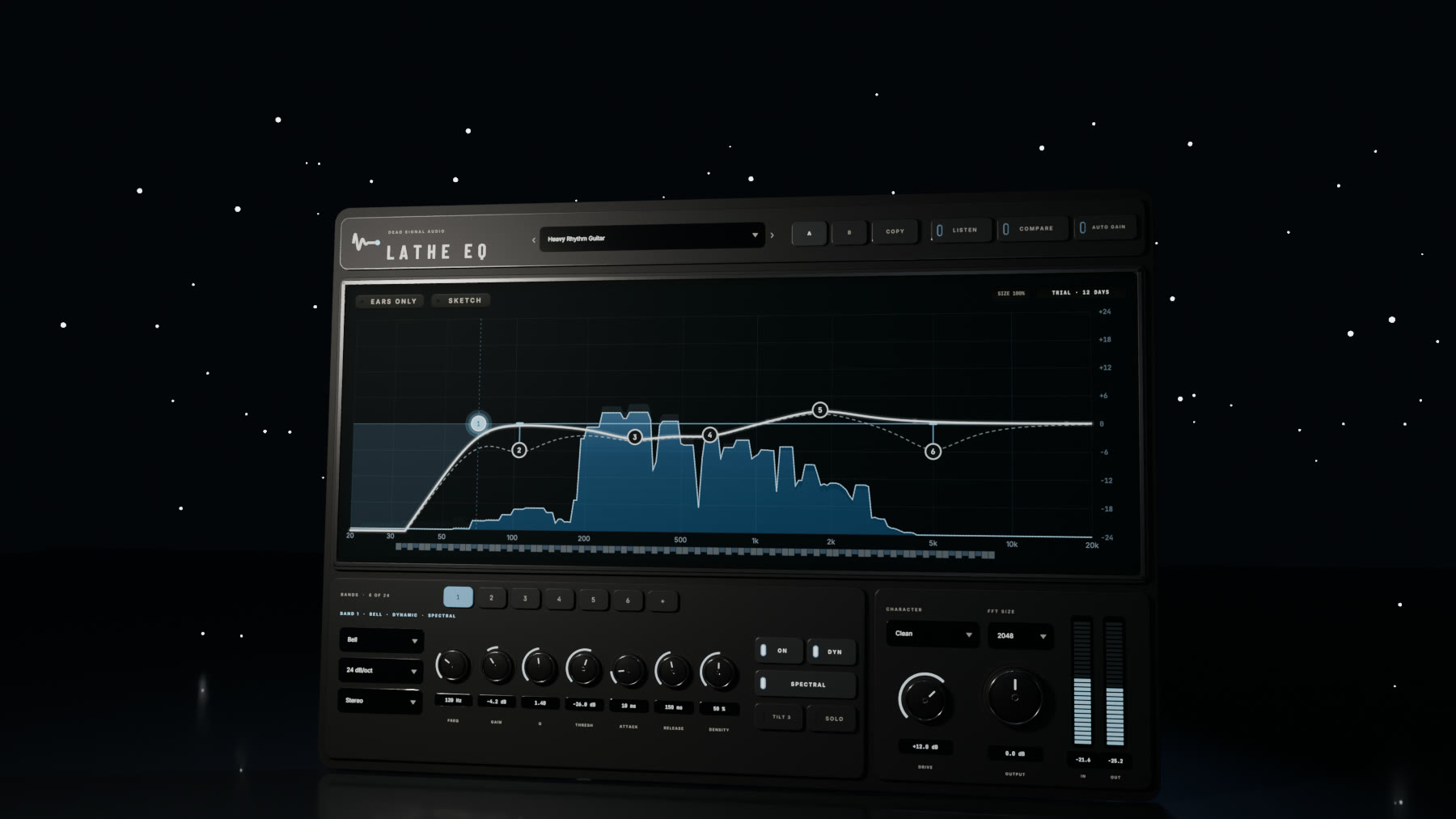
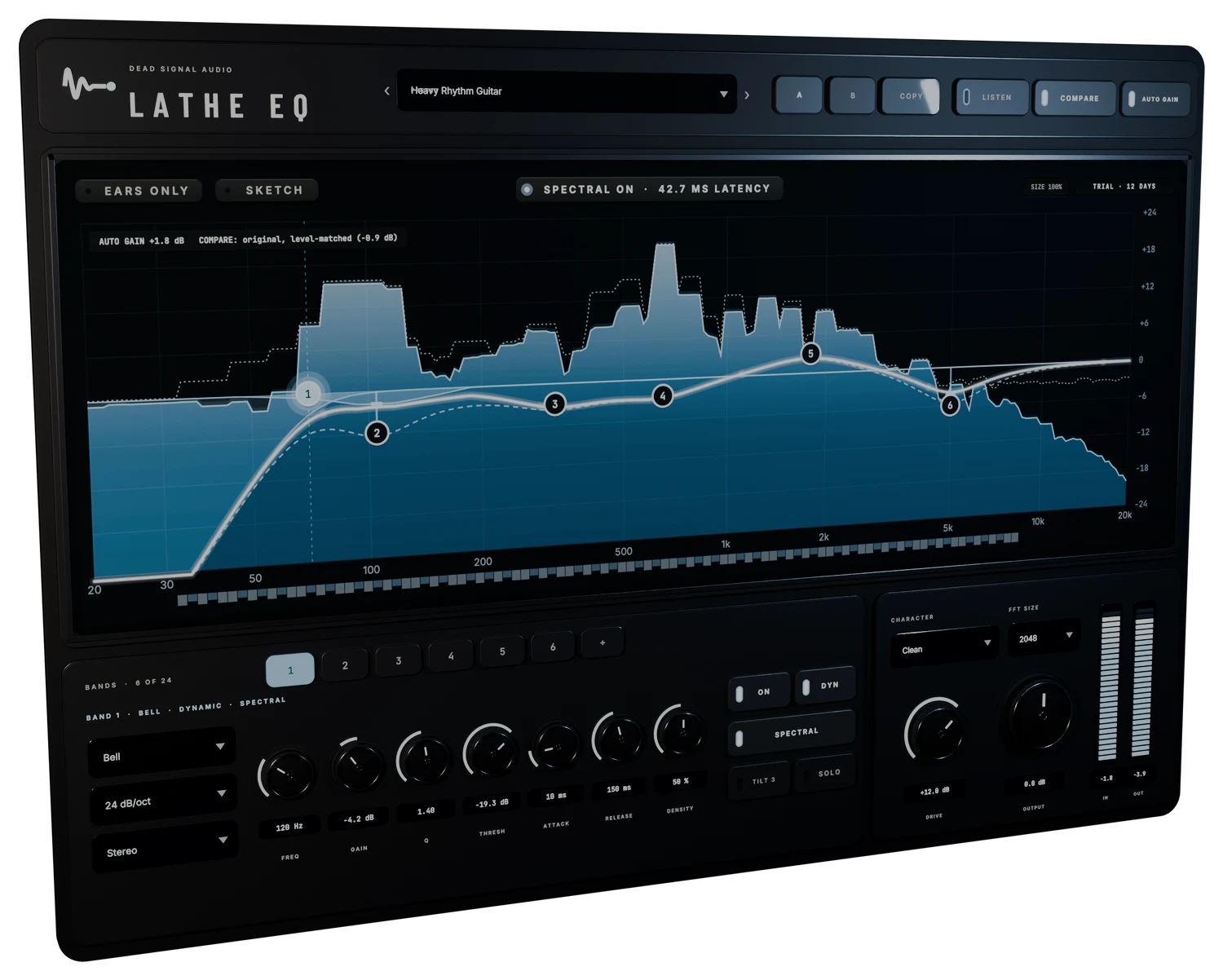
Shape it on the graph. Or let it listen.
An EQ that keeps the shape an analog EQ gives it, holds its own loudness so a boost cannot fool you, and sets its dynamic bands to your track.
Bands that listen.
Any bell or shelf can work only when its range gets loud, with its own attack and release. Hit LISTEN and every dynamic band sets its threshold from five seconds of your track.
165, in a real window.
Categories on the left, the list on the right, search on top and arrow keys to step through. Vocals, guitars, bass, drums, keys, mix bus, mastering, podcast and fixes for hum, rumble and resonances.
Hear the EQ, not the volume.
AUTO GAIN keeps the output as loud as the input, measured on your track. COMPARE plays your original at the same loudness. Louder always wins for a second, and this takes that away.
Lifetime free updates
Buy a license and every future update of Lathe EQ is free.
Try it before you buy
A free 14-day trial of the full plugin, and a 14-day refund if it is not for you.
Mac and Windows together
Every release ships on both. Mac: Audio Unit, VST3 and AAX for Pro Tools. Windows: VST3.
Get Lathe EQ
Buy Lathe EQ
Plus sales tax where it applies. Your total shows before you pay.
Lifetime free updates: every future update of Lathe EQ is free.
Secure checkout by Paddle. Tax is added for your location before you pay. Your license key appears as soon as payment clears.
Try it first: Mac trial · Windows trial · Pro Tools (AAX), Mac only (email needed). Full plugin for 14 days, then it is silent until you unlock it. Install help
Launch news
An email the day each release comes out, plus a free mixing cheat sheet.
Videos
Buy once. Every future update is free.
Buy a license for Lathe EQ and every future update of it is free, for good. No upgrade fees, no subscription.
More details, demos and measurements
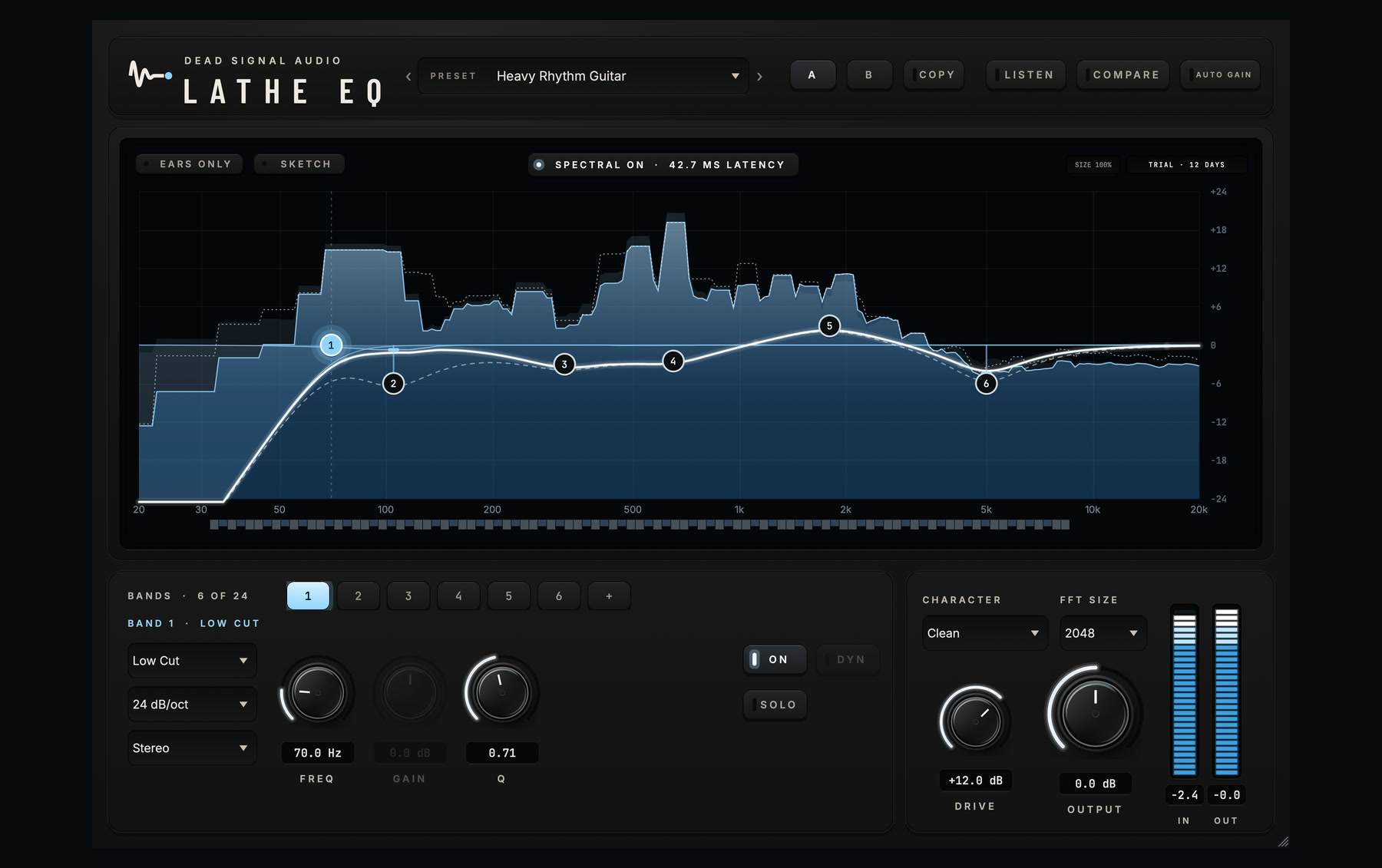
Bands that listen.
Any bell or shelf can work only when its range gets loud, with its own attack and release. Hit LISTEN and every dynamic band sets its threshold from five seconds of your track.
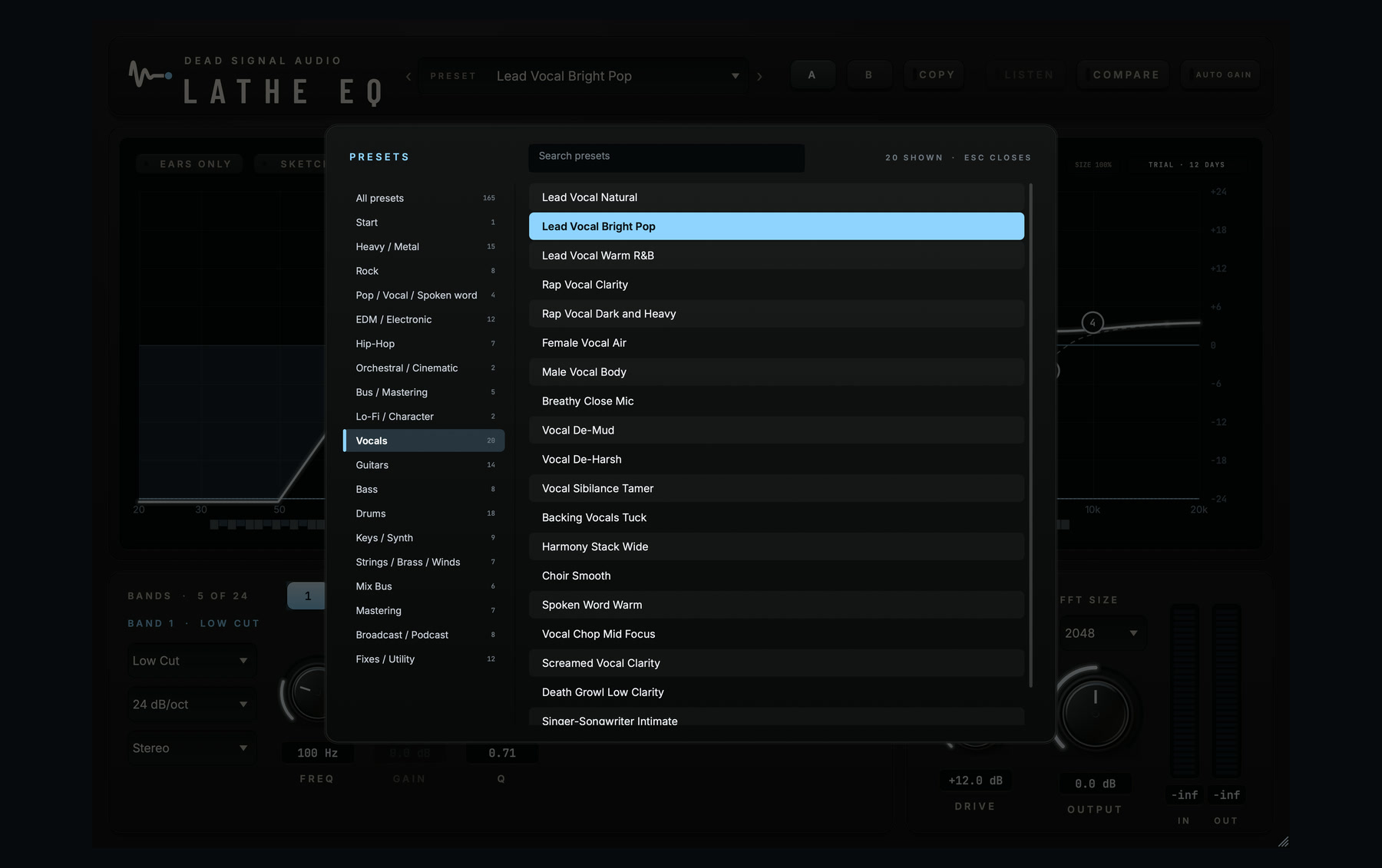
165, in a real window.
Categories on the left, the list on the right, search on top and arrow keys to step through. Vocals, guitars, bass, drums, keys, mix bus, mastering, podcast and fixes for hum, rumble and resonances.
Hear the EQ, not the volume.
AUTO GAIN keeps the output as loud as the input, measured on your track. COMPARE plays your original at the same loudness. Louder always wins for a second, and this takes that away.
Raw riff in. Shaped, not squashed.
Twelve seconds of a track, flat first, then through the Heavy Rhythm Guitar preset after LISTEN fitted two dynamic bands to it. Hit play and flip between them.
Shape it on the graph.
Or let it listen.
Air like analog
Bells, shelves and high cuts follow the analog curve all the way up, instead of squashing toward the top of the range.
AUTO GAIN and COMPARE
AUTO GAIN keeps the output as loud as the input, measured on your track, not guessed from the curve. COMPARE plays your original at the same loudness. Louder always wins for a second. This takes that away.
Dynamic bands that LISTEN
Any bell or shelf can work only when its range gets loud, with its own attack and release. Hit LISTEN and every dynamic band sets its threshold from five seconds of your track.
Per-frequency dynamics (SPECTRAL)
Switch a dynamic band to SPECTRAL and only the frequencies that rise over the threshold are cut or lifted. The rest of the band is left alone. DENSITY sets how selective it is, TILT evens out the trigger across a wide band, and FFT SIZE (1024, 2048 or 4096) trades low-end detail against delay.
Mid, side, left, right
Put any band on the middle, the sides or one channel. Tame a harsh vocal in the centre without touching the guitars out wide.
CHARACTER
Clean adds nothing. Gentle, Warm and Drive add analog-style harmonics, and DRIVE sets how hard you hit them. Run 16x oversampled, so the top end stays clean.
Resonance band
A band that cuts a ring or a harsh peak only while it sticks out of the sound around it, and lets go when it doesn't. TRIGGER sets how far it must stick out. The band's gain is the deepest cut it will make.
Sketch
Draw the curve you want across the graph. Lathe adds the fewest bands that follow it, on top of what you already have, and leaves your existing bands alone.
Ears Only and piano keys
Fade the analyzer so you judge by ear, not by the picture. A piano keyboard runs along the frequency axis, so every frequency is also a note.
24 bands, fast hands
Bell, shelves, low and high cut (12 to 96 dB/oct), notch, band pass and tilt. Double-click to add a band, drag to move it, scroll for width, right-click for type and slope, and a floating inspector follows the band you select. Solo any band, and flip between two full settings with A and B.
165 presets, in a real preset window
Categories on the left, the list on the right, search on top and arrow keys to step through. Vocals, guitars, bass, drums, keys, strings and brass, mix bus, mastering, podcast, fixes (hum, rumble, resonance cleanup), heavy, EDM and hip-hop.
- Air like analog, measured. A +6 dB bell at 15 kHz: at 18 kHz an analog EQ gives +5.3 dB. The textbook digital bell gives +3.0 at 48 kHz. Lathe EQ gives +4.9.
- Dynamic bands that follow your track. On our nu metal riff, LISTEN set the preset's two dynamic bands to -28.8 and -24.8 dB. With the same riff 12 dB quieter, it set them 12 dB lower. Same job, whatever the level.
- SPECTRAL bands, measured. In a broad -18 dB band, a tone over the threshold was cut 17.0 dB while a quiet tone in the same band moved 0.03 dB. The cost: a SPECTRAL band adds delay while it is on (21, 43 or 85 ms at 48 kHz for 1024, 2048 or 4096; Lathe EQ stays at zero latency with none on), so use it for mixing, not tracking. Like any FFT processor, a hard cut rings on both sides of a click, and a quiet partial within about 140 Hz of a loud one that is being cut is disturbed at 2048 (about 70 Hz at 4096, so use 4096 for bass).
- Measured, not guessed. On a raw nu metal riff we recorded, the Heavy Rhythm Guitar preset (after LISTEN) added 3.5 dB at 2 kHz and took 4.1 dB out at 63 Hz, at the same loudness.
- Same look as the rest of the paid line. If you know Vantage, you already know where everything is.
Lathe EQ is included in
Information
Requirements
Mac: macOS 12 or newer, Apple Silicon or Intel.
Windows: 64-bit Windows 10 or 11.
Plug-in formats
Mac: Audio Unit, VST3 and AAX (Pro Tools).
Windows: VST3.
Windows AAX is not available yet.
Updates
Lifetime free updates: every future update of Lathe EQ is free. Changelog
Trial and refund
A free 14-day trial, then a one-time price. 14-day refund, no questions asked. Refund details